The article has been updated successfully.
| Knowledgebase Home | Glossary | Favorites | Contact | Login |
| How to run a birthday query in 4Advisors 3.0 | |||||||
|
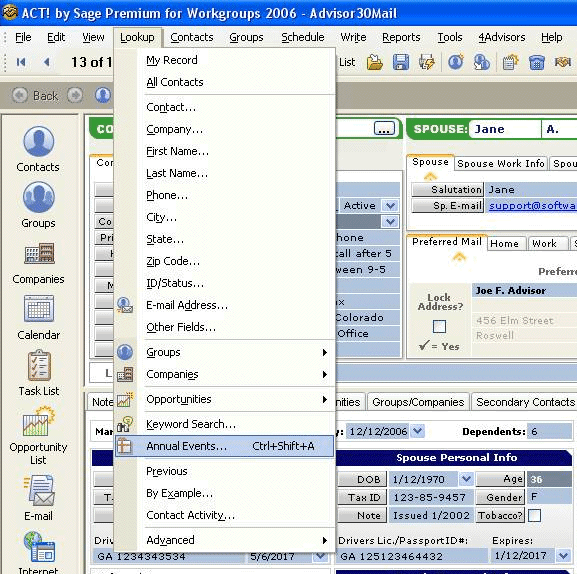
In ACT, go to Lookup and choose Annual Events
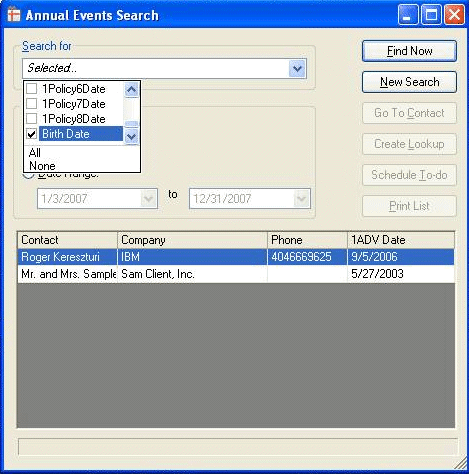
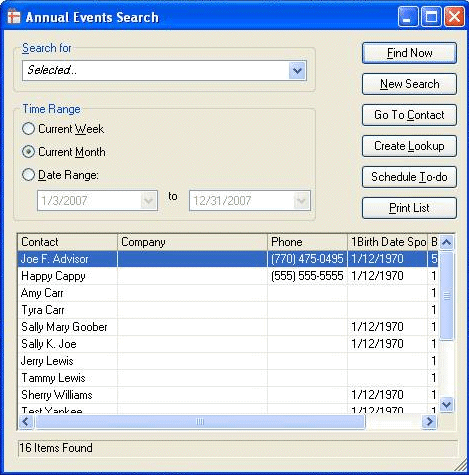
“Search For” press the pulldown menu. You may select Birthdate (contact birthday), 1Child1DOB – 1Child6DOB (Dependents birthday), and 1Birthdate sp (spouse birthday). Choose “Current Month or Date Range” Press “Find Now”
At this point you can “Print List” and/or “Create Lookup” |
|
||||||
| Attachments |
| No attachments were found. |
|
ACT! is a registered trademark of Sage Software, Inc.:::Allied Financial Software, Inc. Copyright 1999-2009
|